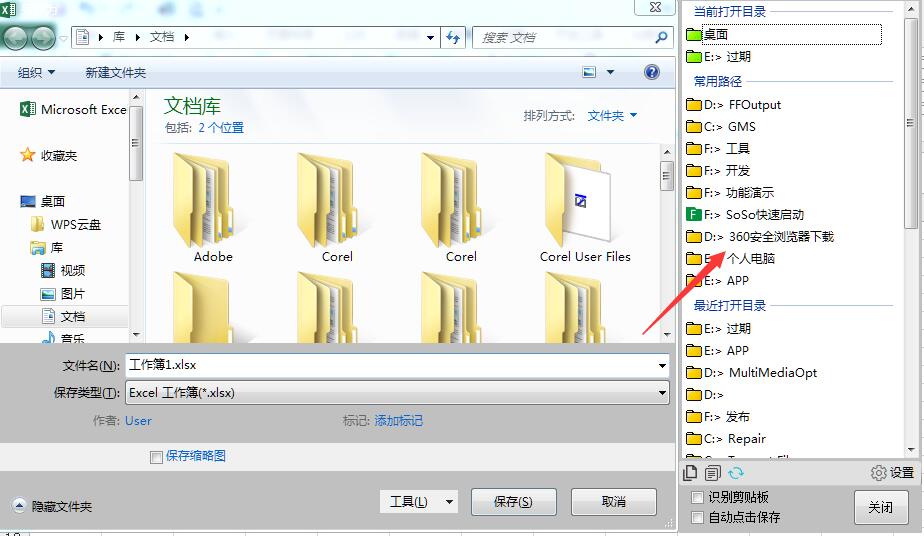
utools有了,但只支持Windows自带文件管理器,第三方不支持……唉,离不开Listary
Listary yes~ 用的6.0.5.16的beta版,目前基本替代everything
uTools 是插件支持还是自带支持?好像没有看到,方便说说吗?
插件:文件夹助手
原来我没有更新软件。所以看不到这个插件。thx 

试了下,还是麻烦了一点,其他功能倒是挺好的
listary不更新真的太伤了
listary有6.0的测试版.
但是采用了node.js技术, 资源占用更多. 而且说实话, 明明是为了美观, 6变得更丑了.
所以我试用后还是用回了5的正式版.
现在由于csgo的原因, 一直停用中.
我现在尝试用 uTools 和 everything 替代它
autohotkey 有个脚本
https://www.autohotkey.com/boards/viewtopic.php?t=25988
甚至比listary的功能还要好用, 直接可以在open/save类窗口中呼出目前开启的目录窗口.
哇哦,有人能把楼上的代码和 这个代码
合并一下吗?
既能自定义添加几个常用文件夹,又能实时展示已打开的文件夹,简直完美。
我也用一款ahk脚本代替Listary了,和楼上的差不多,不过还支持totalcmd
支持TC的对我来说就可以代替listary了,求
#SingleInstance Force
#NoEnv
;#Warn  ; Enable warnings to assist with detecting common errors.
SendMode Input
SetBatchLines -1
SetWorkingDir %A_ScriptDir%


#IfWinActive ahk_class #32770		; Open/Save dialog

^g::								; Control-g
{
	$WinID := WinExist("A")

;---------------[ File Explorer ]----------------------------------------

	For $Exp in ComObjCreate("Shell.Application").Windows	{
		$This := $Exp.Document.Folder.Self.Path
		Menu ContextMenu, Add,  %$This%, Choice
		Menu ContextMenu, Icon, %$This%, shell32.dll, 5
	}

;	Clean up
	$Exp := ""

;---------------[ Total Commander ]--------------------------------------

;	Total Commander internal codes
	cm_CopySrcPathToClip  := 2029
	cm_CopyTrgPathToClip  := 2030

	ClipSaved := ClipboardAll
	Clipboard := ""

	SendMessage 1075, %cm_CopySrcPathToClip%, 0, , ahk_class TTOTAL_CMD

	If (ErrorLevel = 0) {
			Menu ContextMenu, Add
			Menu ContextMenu, Add,  %clipboard%, Choice
			Menu ContextMenu, Icon, %clipboard%, shell32.dll, 5
	}

	SendMessage 1075, %cm_CopyTrgPathToClip%, 0, , ahk_class TTOTAL_CMD

	If (ErrorLevel = 0) {
			Menu ContextMenu, Add,  %clipboard%, Choice
			Menu ContextMenu, Icon, %clipboard%, shell32.dll, 5
	}


	Clipboard := ClipSaved
	ClipSaved := ""

;---------------

	Menu ContextMenu, Show
	Menu ContextMenu, Delete

}

#IfWinActive
Return


;_____________________________________________________________________________
;
					Choice:
;_____________________________________________________________________________
;

	$FolderPath := A_ThisMenuItem
;	MsgBox Folder = %$FolderPath%


	Gosub FeedExplorerOpenSave

return


;_____________________________________________________________________________
;
					FeedExplorerOpenSave:
;_____________________________________________________________________________
;

	WinActivate, ahk_id %$WinID%


;	Read the current text in the "File Name:" box (= $OldText)
	ControlGetText $OldText, Edit1, A
	ControlFocus Edit1, A


;	Go to Folder
	Loop, 5
	{
		ControlSetText, Edit1, %$FolderPath%, ahk_id %$WinID%		; set
		Sleep, 50
		ControlGetText, $CurControlText, Edit1, ahk_id %$WinID%		; check
		if ($CurControlText = $FolderPath)
			break
	}

	Sleep, 50
	ControlSend Edit1, {Enter}, A
	Sleep, 50


;	Insert original filename
	If !$OldText
		return

	Loop, 5
	{
		ControlSetText, Edit1, %$OldText%, A		; set
		Sleep, 50
		ControlGetText, $CurControlText, Edit1, A		; check
		if ($CurControlText = $OldText)
			break
	}

return
可用,非常感谢
listary本来非常好的软件,希望它能尽快更新吧
这个脚本好强。没想到AHK还能这样玩。Ctrl+G能弹出路径,点一下就跳转了。但是不能像listary那样点一下窗口默认就自动跳转。这个脚本值得研究研究,有空看看能不能改造成自动跳转
listary6疯狂报毒,也感觉像半成品。是不是被流氓软件公司收购了,加了好多流氓行为?不敢用了。
牛 这脚本单说跳转功能实际上比listary还好用啊 在打开多个文件夹的情况下 可以任意选择。listary 就做不到这一点。