程序网络控制
最近重新安装了adobe的全家桶,使用的时候总会弹出正版验证,网上有人说把adobe相关的可执行文件都添加到防火墙里阻止访问网络,可以解决这个问题,我试了一下还真行。
然后我就利用AI写了一个这样的小程序,选择相应路径或者文件,即可轻松加入防火墙。
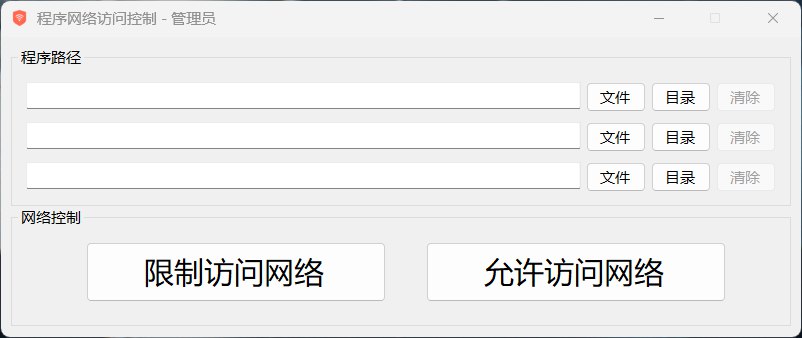
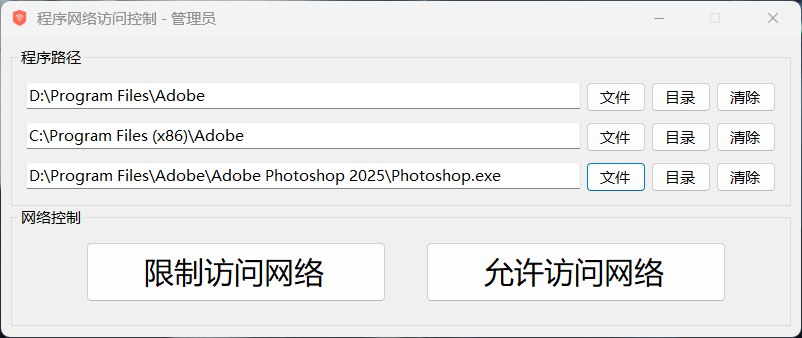
除了可以限制访问网络,还可以解除限制,但是解除的限制仅限由本程序生成的限制条目,其他方式的检测不到。
和谐Adobe的全家桶还是挺好用的。
C:\Program Files (x86)\Common Files\Adobe
C:\Program Files (x86)\Adobe
C:\Program Files\Common Files\Adobe
D:\Program Files\Adobe
这几个路径是需要限制的。前三个应该都一样,最后一条是adobe的安装目录。
这个程序是用c#语言写的,下面是主要功能的代码:
using System;
using System.Collections.Generic;
using System.Windows.Forms;
using System.Security.Principal;
using System.Diagnostics;
using System.Linq;
using System.IO;

namespace NetworkControl
{
    public partial class MainForm : Form
    {
        private List<(FlowLayoutPanel panel, TextBox textBox)> pathRows;

        public MainForm()
        {
            InitializeComponent();
            // 移除这里的初始化,因为在 InitializeComponent 中已经初始化过了
            // pathRows = new List<(FlowLayoutPanel panel, TextBox textBox)>();

            // 设置应用程序图标
            this.Icon = System.Drawing.Icon.ExtractAssociatedIcon(Application.ExecutablePath);

            // 检查管理员权限
            if (IsAdministrator())
            {
                this.Text += " - 管理员";
            }
            else
            {
                var result = MessageBox.Show(
                    "此程序需要管理员权限才能运行。\n是否以管理员身份重新启动程序?",
                    "需要管理员权限",
                    MessageBoxButtons.YesNo,
                    MessageBoxIcon.Question);

                if (result == DialogResult.Yes)
                {
                    // 以管理员身份重启程序
                    ProcessStartInfo startInfo = new ProcessStartInfo
                    {
                        UseShellExecute = true,
                        WorkingDirectory = Environment.CurrentDirectory,
                        FileName = Application.ExecutablePath,
                        Verb = "runas"
                    };

                    try
                    {
                        Process.Start(startInfo);
                        Environment.Exit(0);  // 立即终止当前进程
                    }
                    catch (Exception)
                    {
                        MessageBox.Show("启动失败,程序将退出。", "错误", MessageBoxButtons.OK, MessageBoxIcon.Error);
                        Environment.Exit(1);  // 发生错误时终止进程
                    }
                    return;
                }
                else
                {
                    Environment.Exit(0);  // 使用Environment.Exit替代Application.Exit
                    return;
                }
            }

            InitializeEvents();
        }

        // 检查是否具有管理员权限
        private bool IsAdministrator()
        {
            WindowsIdentity identity = WindowsIdentity.GetCurrent();
            WindowsPrincipal principal = new WindowsPrincipal(identity);
            return principal.IsInRole(WindowsBuiltInRole.Administrator);
        }

        private void InitializeEvents()
        {
            blockButton.Click += BlockButton_Click;
            allowButton.Click += AllowButton_Click;
        }

        private void BlockButton_Click(object sender, EventArgs e)
        {
            var exeFiles = GetExecutableFiles();
            if (exeFiles.Count == 0) return;

            try
            {
                foreach (var exePath in exeFiles)
                {
                    var (inExists, outExists) = CheckFirewallRules(exePath);
                    if (!inExists || !outExists)
                    {
                        ManageFirewallRule(exePath, "add");
                    }
                }
                MessageBox.Show("已成功限制所选程序的网络访问!", "完成", MessageBoxButtons.OK, MessageBoxIcon.Information);
            }
            catch (Exception ex)
            {
                MessageBox.Show($"操作失败:{ex.Message}", "错误", MessageBoxButtons.OK, MessageBoxIcon.Error);
            }
        }

        private void AllowButton_Click(object sender, EventArgs e)
        {
            var exeFiles = GetExecutableFiles();
            if (exeFiles.Count == 0) return;

            try
            {
// 删除未使用的变量声明
                foreach (var exePath in exeFiles)
                {
                    var (inExists, outExists) = CheckFirewallRules(exePath);
                    if (inExists || outExists)
                    {
// 由于foundAnyRule变量未在上下文中定义且不需要,直接删除这行代码
                        ManageFirewallRule(exePath, "delete");
                    }
                }

                MessageBox.Show("已成功解除网络访问限制!", "完成", MessageBoxButtons.OK, MessageBoxIcon.Information);
            }
            catch (Exception ex)
            {
                MessageBox.Show($"操作失败:{ex.Message}", "错误", MessageBoxButtons.OK, MessageBoxIcon.Error);
            }
        }

        // 获取可执行文件列表
        private List<string> GetExecutableFiles()
        {
            var paths = pathRows
                .Select(row => row.textBox.Text.Trim())
                .Where(path => !string.IsNullOrEmpty(path))
                .ToList();

            if (paths.Count == 0)
            {
                MessageBox.Show($"请添加需要处理的文件或目录!", "提示", MessageBoxButtons.OK, MessageBoxIcon.Warning);
                return new List<string>();
            }

            // 输出调试信息
            var pathInfo = string.Join("\n", paths);
            MessageBox.Show($"找到以下路径:\n{pathInfo}", "调试信息", MessageBoxButtons.OK, MessageBoxIcon.Information);

            var exeFiles = new List<string>();

            // 收集所有可执行文件
            foreach (var path in paths)
            {
                if (File.Exists(path) && path.EndsWith(".exe", StringComparison.OrdinalIgnoreCase))
                {
                    exeFiles.Add(path);
                }
                else if (Directory.Exists(path))
                {
                    exeFiles.AddRange(Directory.GetFiles(path, "*.exe", SearchOption.AllDirectories));
                }
            }

            if (exeFiles.Count == 0)
            {
                MessageBox.Show("未找到任何可执行程序!", "提示", MessageBoxButtons.OK, MessageBoxIcon.Warning);
                return new List<string>();
            }

            return exeFiles;
        }

        // 检查防火墙规则是否存在
        private (bool inExists, bool outExists) CheckFirewallRules(string exePath)
        {
            // 修改规则名称,包含完整路径信息
            var ruleName = $"Block_{exePath.Replace("\\", "_").Replace(":", "_")}";

            bool CheckRule(string direction)
            {
                var process = new Process
                {
                    StartInfo = new ProcessStartInfo
                    {
                        FileName = "netsh",
                        Arguments = $"advfirewall firewall show rule name=\"{ruleName}_{direction}\"",
                        UseShellExecute = false,
                        CreateNoWindow = true,
                        RedirectStandardOutput = true,
                        RedirectStandardError = true
                    }
                };
                process.Start();
                process.WaitForExit();
                return process.ExitCode == 0;
            }

            return (CheckRule("in"), CheckRule("out"));
        }

        // 管理防火墙规则
        private void ManageFirewallRule(string exePath, string action)
        {
            // 修改规则名称,包含完整路径信息
            var ruleName = $"Block_{exePath.Replace("\\", "_").Replace(":", "_")}";

            void ProcessRule(string direction)
            {
                var process = new Process
                {
                    StartInfo = new ProcessStartInfo
                    {
                        FileName = "netsh",
                        Arguments = $"advfirewall firewall {action} rule name=\"{ruleName}_{direction}\"" +
                            (action == "add" ? $" dir={direction} action=block program=\"{exePath}\" enable=yes" : ""),
                        UseShellExecute = false,
                        CreateNoWindow = true
                    }
                };
                process.Start();
                process.WaitForExit();
            }

            ProcessRule("in");
            ProcessRule("out");
        }
    }
}
链接:https://pan.quark.cn/s/e879f13308b4
提取码:3d8A
分享一下,希望对其他人有所帮助。
 Adobe 全家桶弹窗搞了好久最后是在Clash添加全局扩展脚本解决的。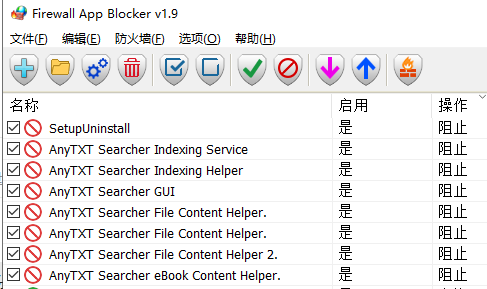
 在全局拓展脚本添加: