【AHK 分享】尝试复刻并增强 Listary 的 Ctrl+G 跳转功能,为文件对话框加上 DOpus 导航引擎

:sparkles: 最终效果展示

  • 智能路径提示:当你打开任何标准的“打开/另存为”对话框时,屏幕左上角会“浮现”一个带阴影的、半透明的窗口,实时显示当前 Directory Opus 正在浏览的路径。
    PixPin_2025-08-04_22-14-01.png
  • 一键丝滑跳转:在对话框中,无需 Ctrl+G,只需快速双击左 Alt 键,脚本就会自动将 DOpus 的路径填入对话框并回车,瞬间带你“穿越”到目标文件夹。

完整脚本(可直接使用)

#NoEnv
#SingleInstance force
SendMode Input
SetWorkingDir %A_ScriptDir%

; =================================================================
; 脚本常量定义
; =================================================================
DOUBLE_CLICK_PERIOD := 400 ; 定义双击间隔时间(毫秒)
TOOLTIP_WIDTH := 210 ; 提示窗口宽度
TOOLTIP_HEIGHT := 30 ; 提示窗口高度

; =================================================================
; 脚本初始化设置
; =================================================================

Menu, Tray, Icon, %A_WinDir%\System32\imageres.dll, 243
SetTitleMatchMode, 2
OnExit, GuiExit

; =================================================================
; 创建带阴影效果的自定义GUI窗口
; =================================================================
Gui, PathTooltip: +AlwaysOnTop -Caption +ToolWindow +E0x20 +HwndPathTooltipHwnd
Gui, PathTooltip: Color, FFFFFF
Gui, PathTooltip: Font, s10 c000000, Microsoft YaHei
Gui, PathTooltip: Add, Text, Center vPathDisplayText w200 x5 y6, Initializing...

; --- DWM API 调用以实现窗口阴影 ---
if DllCall("dwmapi\DwmIsCompositionEnabled", "Int*", compositionEnabled) = 0 && compositionEnabled
{
    attrValue := 2
    DllCall("dwmapi\DwmSetWindowAttribute", "Ptr", PathTooltipHwnd, "Int", 2, "Int*", attrValue, "Int", 4)
    VarSetCapacity(margins, 16, 0)
    NumPut(1, &margins, 0, "Int"), NumPut(1, &margins, 4, "Int"), NumPut(1, &margins, 8, "Int"), NumPut(1, &margins, 12, "Int")
    DllCall("dwmapi\DwmExtendFrameIntoClientArea", "Ptr", PathTooltipHwnd, "Ptr", &margins)
}

; =================================================================
; 文件对话框分组
; =================================================================

GroupAdd, FileDialogs, 另存为 ahk_class #32770
GroupAdd, FileDialogs, 保存 ahk_class #32770
GroupAdd, FileDialogs, 打开 ahk_class #32770
GroupAdd, FileDialogs, 选择文件 ahk_class #32770

; =================================================================
; 定时器:当文件对话框激活时,显示DOpus路径提示
; =================================================================

SetTimer, ShowDopusPathInDialog, 250
return

ShowDopusPathInDialog:
    ; [修复] 判断窗口激活的同时,获取其唯一句柄(HWND)到变量 hwnd
    if (hwnd := WinActive("ahk_group FileDialogs"))
    {
        dopusPath := GetActiveDopusPath()
        display_text := (dopusPath != "") ? dopusPath : "未找到活动的 Directory Opus 路径"
        GuiControl, PathTooltip:, PathDisplayText, % display_text
        
        ; [修复] 使用窗口句柄(ahk_id)来精确获取位置,避免竞态条件
        WinGetPos, DlgX, DlgY, , , ahk_id %hwnd%
        
        ; 计算提示窗口的位置
        NewX := DlgX + 25
        NewY := DlgY + 10
        
        ; 确保提示窗口不会显示在屏幕之外
        SysGet, screenWidth, 78
        SysGet, screenHeight, 79
        if (NewX + TOOLTIP_WIDTH > screenWidth)
            NewX := screenWidth - TOOLTIP_WIDTH
        if (NewY + TOOLTIP_HEIGHT > screenHeight)
            NewY := screenHeight - TOOLTIP_HEIGHT
        
        ; 显示并定位提示窗口,使用 NoActivate 避免抢占焦点
        Gui, PathTooltip: Show, x%NewX% y%NewY% w%TOOLTIP_WIDTH% h%TOOLTIP_HEIGHT% NoActivate
    }
    else
    {
        Gui, PathTooltip: Hide
    }
return

; =================================================================
; 核心逻辑 - 双击Alt跳转路径
; =================================================================

#IfWinActive ahk_group FileDialogs
~LAlt::
{
    if (A_PriorHotkey = "~LAlt" and A_TimeSincePriorHotkey < DOUBLE_CLICK_PERIOD)
    {
        dopusPath := GetActiveDopusPath()
        if (dopusPath = "")
        {
            dopusPath := "C:\"
            MsgBox, 48, 路径错误, 无法获取Directory Opus路径!`n将使用默认路径: %dopusPath%
        }
        NavigateFileDialog(dopusPath)
    }
    return
}
#IfWinActive

; =================================================================
; 函数与子程序
; =================================================================

GetActiveDopusPath()
{
    if WinActive("ahk_exe dopus.exe")
    {
        WinGetTitle, activeTitle, A
        path := ParseDopusTitle(activeTitle)
        if (path != "")
            return path
    }
    WinGet, id, List, ahk_exe dopus.exe
    if (id = 0)
        return ""
    WinGetTitle, topTitle, ahk_id %id1%
    return ParseDopusTitle(topTitle)
}

ParseDopusTitle(title)
{
    if (SubStr(title, 1, 6) = "DOpus " and StrLen(title) > 8)
        return SubStr(title, 9)
    return ""
}

NavigateFileDialog(path)
{
    ControlFocus, Edit1, A
    Sleep, 50
    ControlSetText, Edit1, %path%, A
    Sleep, 100
    ControlSend, Edit1, {Space}{Backspace}, A
    Sleep, 150
    Send, {Enter}
}

GuiExit:
    Gui, PathTooltip: Destroy
    ExitApp

当然,它还有扩展的空间。欢迎各位 AHK 高手提出宝贵的优化建议!

2 个赞

listary可设置无需按ctrl+G,只需点一下目标文件夹,对话框会自动跳转到目标路径的。

#NoEnv
#SingleInstance force
SendMode Input
SetWorkingDir %A_ScriptDir%

; =================================================================
; 脚本常量和全局变量
; =================================================================
TOOLTIP_WIDTH := 580       ; 提示窗口宽度
TOOLTIP_HEIGHT := 32       ; 提示窗口高度
g_lastSyncedPath := ""     ; 全局变量,用于防止对同一路径的重复操作
g_isDialogActive := false  ; 性能优化的核心:对话框激活状态标志

; =================================================================
; 脚本初始化设置
; =================================================================
Menu, Tray, Icon, %A_WinDir%\System32\imageres.dll, 243
SetTitleMatchMode, 2
OnExit, GuiExit

; =================================================================
; 创建带阴影效果的自定义GUI窗口
; =================================================================
Gui, PathTooltip: +AlwaysOnTop -Caption +ToolWindow +E0x20 +HwndPathTooltipHwnd
Gui, PathTooltip: Color, 000000
Gui, PathTooltip: Font, s10 cCCCCCC, Microsoft YaHei
Gui, PathTooltip: Add, Text, Center vPathDisplayText w570 x5 y7, Initializing...

; --- DWM API 调用以实现窗口阴影 ---
if DllCall("dwmapi\DwmIsCompositionEnabled", "Int*", compositionEnabled) = 0 && compositionEnabled
{
    attrValue := 2
    DllCall("dwmapi\DwmSetWindowAttribute", "Ptr", PathTooltipHwnd, "Int", 2, "Int*", attrValue, "Int", 4)
    VarSetCapacity(margins, 16, 0)
    NumPut(1, &margins, 0, "Int"), NumPut(1, &margins, 4, "Int"), NumPut(1, &margins, 8, "Int"), NumPut(1, &margins, 12, "Int")
    DllCall("dwmapi\DwmExtendFrameIntoClientArea", "Ptr", PathTooltipHwnd, "Ptr", &margins)
}

; =================================================================
; 文件对话框分组
; =================================================================
GroupAdd, FileDialogs, 另存为 ahk_class #32770
GroupAdd, FileDialogs, 打开 ahk_class #32770
GroupAdd, FileDialogs, 选择文件 ahk_class #32770

; =================================================================
; 核心逻辑:带状态管理的高效单定时器
; =================================================================
SetTimer, SyncDopusPath, 250
return

SyncDopusPath:
    Critical ; 确保操作的原子性

    global g_lastSyncedPath, g_isDialogActive

    ; 检查当前是否有文件对话框处于激活状态
    isActiveNow := WinActive("ahk_group FileDialogs")

    if (isActiveNow)
    {
        ; --- 状态:对话框已激活 ---

        ; 如果是首次检测到对话框激活,则更新状态标志
        if (!g_isDialogActive)
        {
            g_isDialogActive := true
            g_lastSyncedPath := "" ; 为新对话框重置路径记录
        }
        
        dialogHwnd := WinExist("A") ; 直接获取当前激活窗口的句柄
        currentDopusPath := GetTopmostDopusPath()

        if (currentDopusPath = "")
        {
            ShowTooltip("Click a Directory Opus window...", dialogHwnd) ; 优化:给出友好提示
            return
        }
        
        if (currentDopusPath != g_lastSyncedPath)
        {
            g_lastSyncedPath := currentDopusPath
            NavigateFileDialog(currentDopusPath, dialogHwnd)
        }
        
        ShowTooltip(currentDopusPath, dialogHwnd)
    }
    else
    {
        ; --- 状态:对话框未激活 ---

        ; 如果之前是激活状态(意味着对话框刚刚关闭),则执行一次性清理工作
        if (g_isDialogActive)
        {
            g_isDialogActive := false ; 更新状态标志
            Gui, PathTooltip: Hide    ; 隐藏提示窗口
            g_lastSyncedPath := ""    ; 重置路径
        }
        ; 如果之前就不是激活状态,则什么都不做。这是性能优化的关键!
    }
return

; =================================================================
; 函数与子程序
; =================================================================

GetTopmostDopusPath()
{
    ; 性能优化:使用静态变量缓存上次的结果,避免重复解析
    static lastTitle := "", lastPath := ""

    WinGet, id, List, ahk_exe dopus.exe
    if !id
        return ""
    
    WinGetTitle, topTitle, ahk_id %id1%

    ; 如果窗口标题和上次一样,直接返回缓存的路径,不再执行正则匹配
    if (topTitle = lastTitle)
        return lastPath
    
    ; 如果标题变了,则重新解析并更新缓存
    newPath := ParseDopusTitle(topTitle)
    lastTitle := topTitle
    lastPath := newPath
    return newPath
}

ParseDopusTitle(title)
{
    if RegExMatch(title, "([A-Z]:\\[^\*\""<>\|]+)", path)
    {
        SplitPath, path, , dir
        if FileExist(dir)
            return Trim(path)
    }
    if (SubStr(title, 1, 6) = "DOpus " and StrLen(title) > 8)
        return Trim(SubStr(title, 9))
    return ""
}

NavigateFileDialog(path, hwnd)
{
    ControlFocus, Edit1, ahk_id %hwnd%
    Sleep, 50
    ControlSetText, Edit1, %path%, ahk_id %hwnd%
    Sleep, 100
    ControlSend, Edit1, {Space}{Backspace}, ahk_id %hwnd%
    Sleep, 150
    SendInput, {Enter}
}

ShowTooltip(text, hwnd)
{
    global TOOLTIP_WIDTH, TOOLTIP_HEIGHT, PathTooltipHwnd
    
    GuiControl, PathTooltip:, PathDisplayText, % text
    
    WinGetPos, DlgX, DlgY, , , ahk_id %hwnd%
    if (DlgX = "" or DlgY = "")
        return

    NewX := DlgX + 25, NewY := DlgY + 12
    
    SysGet, mon1, Monitor, 1
    if (NewX + TOOLTIP_WIDTH > mon1Right)
        NewX := mon1Right - TOOLTIP_WIDTH
    if (NewY + TOOLTIP_HEIGHT > mon1Bottom)
        NewY := mon1Bottom - TOOLTIP_HEIGHT

    Gui, PathTooltip: Show, x%NewX% y%NewY% w%TOOLTIP_WIDTH% h%TOOLTIP_HEIGHT% NoActivate
}

GuiExit:
    SetTimer, SyncDopusPath, Off
    Gui, PathTooltip: Destroy
    ExitApp

ahk1.0还是2.0版本的呢

1.0 版

未找到活动的opus路径,用英文软件的时候直接不提示,opus是开着的。。。

[AHK] Switch to active DOpus list path in Save As/Open Dialogue with MiddleClick - Buttons/Scripts - Directory Opus Resource Centre

试试这个

;https://gist.github.com/akaleeroy/f23bd4dd2ddae63ece2582ede842b028#file-currently-opened-folders-md
; a fork from above script, which works for Windows Explorer, author: Leeroy
; further, above script was inspired by author: Savage
; the script works with Directory Opus, but with below prerequisites:
;  1. Your DOpus setting has set the title bar starts with "DOpus"
;  2. Your DOpus seeting has set the title bar "Display full path"
; in my case, I set the title bar "DOpus | C:\xxxxxx", hence my script will cut off 8 chacters from the title string
; please adapt the script on your own to fit your settings
#SingleInstance, Force
#KeyHistory, 0
SetBatchLines, -1
ListLines, Off
SendMode Input ; Forces Send and SendRaw to use SendInput buffering for speed.
SetTitleMatchMode, 2 ; 
#MaxThreadsPerHotkey, 1 ; no re-entrant hotkey handling

;   two sets of keys, both active
; Middle-MouseButton, CTRL+G, like Listary
f_Hotkey = ~MButton
f_HotkeyCombo = ~^g


; Auto-execute section.
Hotkey, %f_Hotkey%, f_Jump2ActivePath
Hotkey, %f_HotkeyCombo%, f_Jump2ActivePath
return 

f_Jump2ActivePath:
;validate the correct dialogue type
WinGet, f_window_id, ID, a
WinGetClass, f_class, a
; Don't display menu unless it's a dialog or console window
if f_class not in #32770,ConsoleWindowClass
return


; get the path from Dopus
WinGet, id, list, ahk_exe dopus.exe			;get IDs for all DOpus windows
    Loop, %id% 							;Loop through IDs of all DOpus windows
    {
        this_ID := id%A_Index%
        WinGetTitle, Title, ahk_id %this_ID%			;get the title of the current window
        StringLeft, Left6, Title, 6
        ; MsgBox, %Left6%
        ; if Left6=="DOpus "
        ; {
            StringLen, TitleLen, Title 
            StringRight, DopusPath, Title, TitleLen-8
            ; MsgBox, %DopusPath%
            break            
        ; }
    }
    ; return


if f_class = #32770 ; It's a dialog.
{
    ; Activate the window so that if the user is middle-clicking
    ; outside the dialog, subsequent clicks will also work:
    WinActivate ahk_id %f_window_id%
    ; Alt+D to convert Address bar from breadcrumbs to editbox
    Send !{d}
    ; Wait for focus
    Sleep 50
    ; The control that's focused after Alt+D is thus the address bar
    ControlGetFocus, addressbar, a
    ; Put in the chosen path
    ControlSetText %addressbar%, % DopusPath, a
    Sleep 50
    ; Go there
    ControlSend %addressbar%, {Enter}, a
    ; Return focus to filename field
    ControlFocus Edit1, a
    return
}
; In a console window, pushd to that directory
else if f_class = ConsoleWindowClass
{
    ; Because sometimes the mclick deactivates it.
    WinActivate, ahk_id %f_window_id%
    ; This will be in effect only for the duration of this thread.
    SetKeyDelay, 0
    ; Clear existing text from prompt and send pushd command
    Send, {Esc}pushd %DopusPath%{Enter}
    return
}
return

要保存为带有BOM 的 UTF-8 格式。

image.png

我这边win10 系统。未测试 win11 系统。提示:要保存为带有BOM 的 UTF-8 格式。

image.png

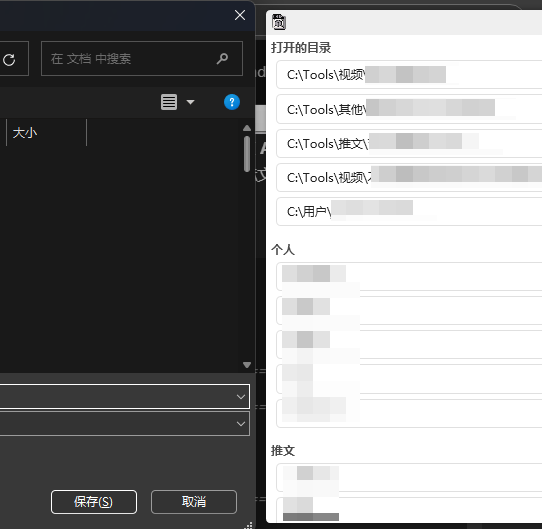
我是用 quicker 写的一个,do 能开很多标签页都能识别到,另外还能存一些常用的地址

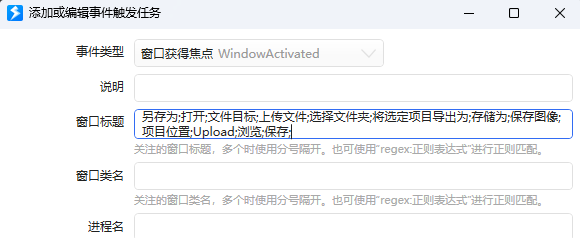
不过没做快捷键,得鼠标选择一下,对于窗口的识别是通过窗口名字来的,所以有时候遇到不同的另存为窗口还得手动加一下

能否分享一下。

那你这个动作是需要先在quicker上先触发动作 再选择文件夹 还是说后台运行 选择时自动弹出路径选择窗口

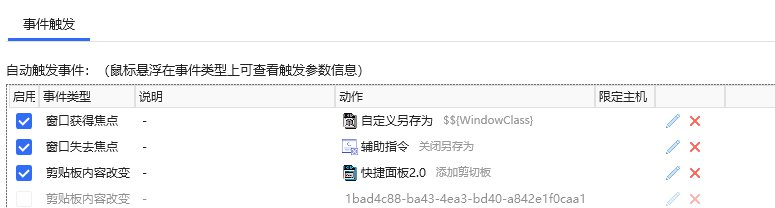
我不太喜欢后台常驻,所以是通过quicker的 [事件触发] 实现的自动弹出

就是的自己手动添加一下窗口名字来识别

正常来说选择了路径界面就会消失,但如果不选择路径,关闭窗口页面也没办法自动关闭,所以还需要另外一个失去焦点的触发来实现不选择路径时的自动关闭,因为是自己用的就没管太多

是基于Quciker的 :joy:,必须依附在Quicker下才能运行,您可以先了解一下Quicker

另外的话,因为我是自用的,也没考虑到分享,所以这个动作是联动之前写的另一个动作传递的数据,分享的话就需要重新制作了,这边我可以分享一下我的思路:

ps:非编程专业的,所以很多东西都写的很拉,最后全都替换成Quicker直接相关的动作模块了,可能没有太多参考价值

Quicker支持直接设置DO为默认资源管理器

这种情况下Quicker的“获取资源管理器”模块可以直接识别到DO的全部标签页

(我一开始没有发现,是通过读取DO窗口标题的方式实现的,这样只能获取DO正在展示(操作?)的那一页地址)

获取了数据之后就处理成列表,“获取资源管理器”还支持在文件管理页面跳转指定地址,所以直接将选择的地址传给这个模块就好了。

(在这之前我是使用快捷键的方式来实现填充跳转的,Ctrl+z 定位到地址栏,粘贴地址后回车这样。很粗糙,但能用XD)

弹出位置就是获取窗口大小、位置,然后减一减算一算的事儿了。

如果您确实对Quicker的动作感兴趣,我可以找时间重新制作一个单动作的分享出来,不过其实都是Quikcer的功能,没有任何技术含量就是了 :joy:

(既然Quicker的动作模块可以直接识别到多标签页内容,并且直接支持DO,我想是有一个系统通用的接口可以调用的,或许您可以搜索一下)

事件触发? 很不错:+1:t2:

quicker的各种触发都很好用,可以代替动作的后台识别,有一个很好用的剪切板动作它需要后台常驻,我不太喜欢就自己搞了一个事件触发的,也很舒服

鼠标触发也可以写很多有趣的功能,我写了一个左键+右键就能触发的快捷小窗口,可以实现类似划词翻译的触发,然后添加任意识别文字起手的动作就能实现很多功能了

唯一的缺点就是不方便分享给他人,安装动作之后还需要专门配置一下才能正常使用 :joy:
所以除了剪贴板花时间完善了一下分享出去了,其他动作基本都是自用,很粗糙 :melting_face:

可以
我的Quicker 使用的是鼠标侧键 前进键 触发 然后将前进键和后退键更换位置(通过鼠标驱动) 再用AHK实现ALT+后退键 触发 前进键 这样就不影响我正常使用 (后退键用的多 前进键用得少)
目前,我需要监测的任务 我都是写python生成exe 挂到后台 然后固定时间检测一次 quicker的事件触发我基本没怎么用过 只加了一个别人的自动抬起微信F22按键 你提醒了我 之后有需要我可以直接使用Quicker的事件触发功能 不过我不是专业版 还剩1条规则余额 :rofl:

1 个赞

谢谢分享

真的不好意思,忘了说需要修改标题,如下图,为了正确识别DOpus窗口,所以前面得加上(直接复制就行)

Dopus |

PixPin_2025-08-11_11-59-39.png

不好意思,帖子给ai润色,没写好,如果要想正常使用,的设置一下自定义标题。
PixPin_2025-08-11_11-59-39.png