Qingwa
(青小蛙)
1
原始链接在: AudioMass - 核心不到 100KB,在线、开源,多轨音频编辑器 - 小众软件
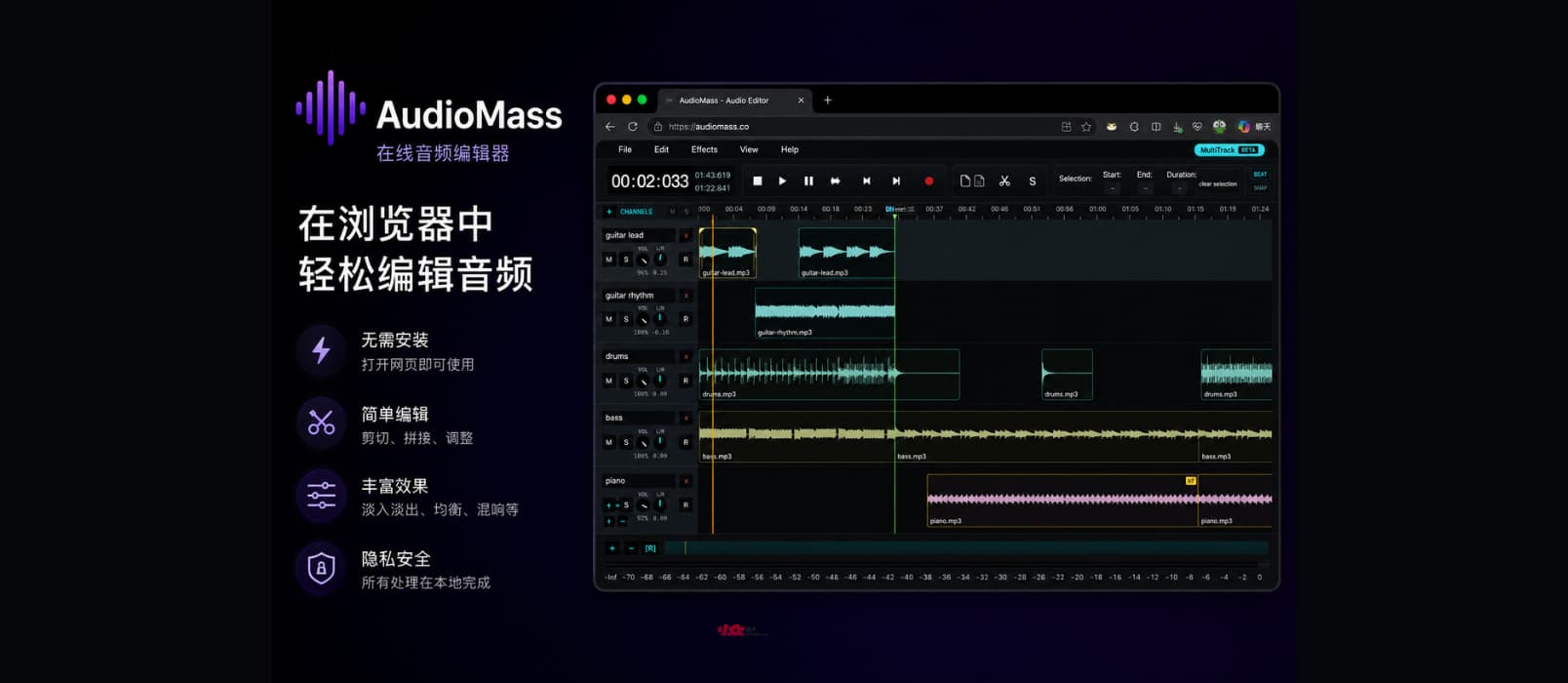
AudioMass 是一款免费、开源、完全运行在浏览器里的音频编辑工具。不用下载、不用安装,无后台服务,打开网页就能直接处理音频文件,所有操作都在本地浏览器完成。核心 JS 文件只有 100KB 大小。@Appinn
AudioMass 主要功能
AudioMass 可以直接在音轨中录音、导入现有音频,并提供常见的波形编辑功能,比如裁剪、剪切、拼接、复制、淡入淡出、音量调整等。同时还内置了压缩、均衡器、混响、延迟、失真、变调等多种音频效果,适合快速处理播客、配音、BGM、短视频音频等内容。
AudioMass 的一个特点是“轻”。整个项目使用原生 JavaScript 编写,没有依赖大型框架,体积很小,但界面和功能已经接近传统桌面音频编辑软件。它还支持快捷键操作、频谱可视化、撤销历史等功能,日常简单编辑基本够用。
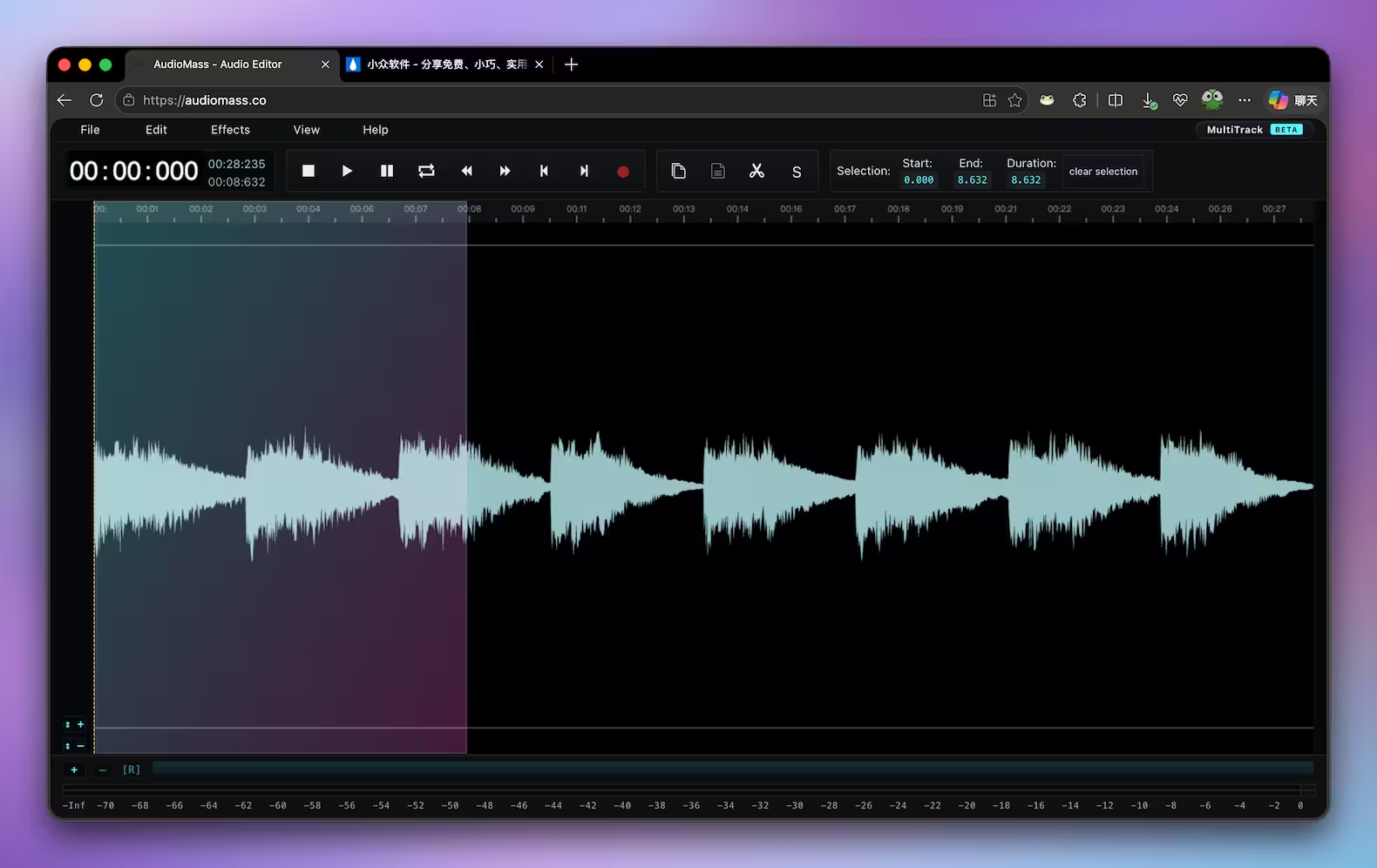
在多轨道界面中双击某一段音频,即可进入单轨编辑界面:
老派、原生 JavaScript 手写而成
开发者强调:
it is written solely in plain old-school javascript, weighs under 100kb compressed and has no backend or framework dependencies.
它完全使用老派原生 JavaScript 手写而成,压缩后不到 100KB,没有后端,也没有任何框架依赖。
是的,没用现代前端那一大堆复杂框架:
- 不用 React
- 不用 Vue
- 不用 Angular
- 不用 Electron
- 不用 Webpack 大型构建体系
- 不依赖 npm 巨量依赖包
简单用用
对于大多数人来说,简单用用非常方便
- 不需要下载安装
- 不需要注册账号
- 不需要上传音频到服务器
- 打开网页即可编辑
- Windows、macOS、Linux 都能直接使用
如果只是想临时剪一段音频、处理播客片段、做铃声、调节音量,或者快速加个淡入淡出效果,它比安装完整的 Audacity 更轻松。
部署方式
官方提供了一个实例,可以直接使用:
如果想要自托管,只需要从 GitHub 下载代码后,进入 src 目录,运行
go run audiomass-server.go
无 Go 环境的,也可以通过 Python 运行:
python audiomass-server.py
然后访问 http://localhost:5055/ 即可。
如果两个环境都没有,这边建议交给 OpenClaw 类工具处理,嗯。
原文:https://www.appinn.com/audiomass/
4 个赞
端口应该是 5056 吧?我这边用 Python 运行后,端口是 5056:
$ python3 audiomass-server.py
serving at port 5056
其实具体端口可以到 audiomass-server.py 文件里面改的,这个文件的内容如下:
import http.server
import socketserver
PORT = 5056
Handler = http.server.SimpleHTTPRequestHandler
httpd = socketserver.TCPServer(("", PORT), Handler)
print("serving at port", PORT)
httpd.serve_forever()
需要自定义端口的话,改一下第 3 行即可。
TecNico
(xianii)
4
居然还有effect!!! 对于我来说, 这种音频编辑的小应用只要满足体积小,启动快,功能上面只要能剪和拼接就完全够用了.
其实这个不需要 Python,也不需要 Go,只需要有一个 HTTP 服务器即可。
比如,甚至可以直接用之前论坛介绍过的文件分享工具 dufs:
具体操作为:
#1 将 AudioMass 克隆到本地
git clone https://github.com/pkalogiros/AudioMass/

#2 进入仓库下的 src 目录
cd ./AudioMass/src

#3 开启 dufs http 服务器
dufs --render-index

# 服务器启动后,会看到如下信息
Listening on:
  http://127.0.0.1:5000/
  http://192.168.122.1:5000/
  http://[::1]:5000/

# 浏览器访问 http://127.0.0.1:5000/ 或 http://localhost:5000/
# 即可进入 AudioMass 主界面
1 个赞
TecNico
(xianii)
7
是的,很多本地文件服务器都可以直接挂载网页访问. 比如 hfs
那估计可以做基于webview的应用了,比如tauri或者pywebview之类的
zlvb
(Zhang Li)
9
如果你的电脑已经安装:
运行下面这个bat,可以得到:AudioMass.exe(21.1 MB)
@echo off
setlocal EnableExtensions

REM ============================================================
REM AudioMass one-shot bootstrap + build script
REM   - Clones AudioMass-src from GitHub if missing
REM   - Generates desktop\ (Tauri v2 shell) from embedded templates if missing
REM   - Runs cargo build --release
REM   - Copies AudioMass.exe to project root
REM Output: %~dp0AudioMass.exe
REM
REM Prereqs the user must have installed:
REM   git, node (with npm), rustup-installed cargo+rustc, WebView2 Runtime
REM ============================================================

set ROOT=%~dp0
if "%ROOT:~-1%"=="\" set ROOT=%ROOT:~0,-1%

set SRC_DIR=%ROOT%\AudioMass-src
set DESKTOP_DIR=%ROOT%\desktop
set TAURI_DIR=%DESKTOP_DIR%\src-tauri
set BUILT_EXE=%TAURI_DIR%\target\release\AudioMass.exe
set TARGET_EXE=%ROOT%\AudioMass.exe
set REPO_URL=https://github.com/pkalogiros/AudioMass.git
set REPO_BRANCH=production

echo === AudioMass one-shot build ===
echo ROOT       = %ROOT%
echo SRC_DIR    = %SRC_DIR%
echo DESKTOP    = %DESKTOP_DIR%
echo TARGET_EXE = %TARGET_EXE%
echo.

REM ---- step 0: toolchain check ----
echo [0/5] toolchain check ...
where git >nul 2>nul
if errorlevel 1 echo ERROR: 'git' not found in PATH. Install Git for Windows first.& exit /b 1
where node >nul 2>nul
if errorlevel 1 echo ERROR: 'node' not found in PATH. Install Node.js LTS first.& exit /b 1
where npm >nul 2>nul
if errorlevel 1 echo ERROR: 'npm' not found in PATH. Install Node.js LTS first.& exit /b 1
where cargo >nul 2>nul
if errorlevel 1 echo ERROR: 'cargo' not found in PATH. Install Rust via https://rustup.rs/ & exit /b 1
where rustc >nul 2>nul
if errorlevel 1 echo ERROR: 'rustc' not found in PATH. Install Rust via https://rustup.rs/ & exit /b 1
echo OK
echo.

REM ---- step 1: ensure AudioMass-src ----
echo [1/5] ensure AudioMass-src ...
if exist "%SRC_DIR%\.git" goto :pull_src
if exist "%SRC_DIR%" echo ERROR: %SRC_DIR% exists but is not a git repo. Remove it and retry.& exit /b 1
echo Cloning AudioMass from %REPO_URL% branch %REPO_BRANCH% ...
git clone --depth 1 -b %REPO_BRANCH% %REPO_URL% "%SRC_DIR%"
if errorlevel 1 echo ERROR: git clone failed.& exit /b 1
goto :after_src

:pull_src
echo AudioMass-src exists, pulling latest ...
pushd "%SRC_DIR%" >nul
git pull --ff-only
if errorlevel 1 popd & echo ERROR: git pull failed.& exit /b 1
popd >nul

:after_src
echo.

REM ---- step 2: ensure desktop shell ----
echo [2/5] ensure desktop shell ...
if exist "%DESKTOP_DIR%\package.json" goto :after_shell
echo desktop shell not found, generating from embedded templates ...
call :gen_desktop
if errorlevel 1 echo ERROR: desktop generation failed.& exit /b 1
goto :after_shell_gen

:after_shell
echo desktop shell exists, skip generation.

:after_shell_gen
echo.

REM ---- step 3: npm install ----
echo [3/5] npm install ...
pushd "%DESKTOP_DIR%" >nul
call npm install --no-audit --no-fund --loglevel=error
if errorlevel 1 popd & echo ERROR: npm install failed.& exit /b 1
popd >nul
echo.

REM ---- step 4: cargo build --release ----
echo [4/5] cargo build --release ...
pushd "%TAURI_DIR%" >nul
cargo build --release
if errorlevel 1 popd & echo ERROR: cargo build failed.& exit /b 1
popd >nul
echo.

REM ---- step 5: copy exe ----
echo [5/5] copy AudioMass.exe to project root ...
if not exist "%BUILT_EXE%" echo ERROR: expected build artifact not found: %BUILT_EXE%& exit /b 1
copy /Y "%BUILT_EXE%" "%TARGET_EXE%" >nul
if errorlevel 1 echo ERROR: copy failed.& exit /b 1
if exist "%ROOT%\desktop.exe" del /Q "%ROOT%\desktop.exe"

echo.
echo === DONE ===
echo Output: %TARGET_EXE%
for %%I in ("%TARGET_EXE%") do echo Size:   %%~zI bytes
endlocal
exit /b 0


REM ============================================================
REM :gen_desktop - emit Tauri v2 shell files using single-line redirects
REM ============================================================
:gen_desktop
mkdir "%DESKTOP_DIR%" 2>nul
mkdir "%TAURI_DIR%" 2>nul
mkdir "%TAURI_DIR%\src" 2>nul
mkdir "%TAURI_DIR%\capabilities" 2>nul
mkdir "%TAURI_DIR%\icons" 2>nul

REM ---- desktop\src-tauri\icons\icon.ico (minimal 1x1 32bpp, decoded from base64) ----
set ICO_B64=%TAURI_DIR%\icons\icon.ico.b64
> "%ICO_B64%" echo AAABAAEAAQEAAAEAIAAwAAAAFgAAACgAAAABAAAAAgAAAAEAIAAAAAAAAAAAAAAAAAAAAAAAAAAAAAAAAAAAAAAAAAAAAA==
certutil -decode "%ICO_B64%" "%TAURI_DIR%\icons\icon.ico" >nul
if errorlevel 1 echo ERROR: failed to decode placeholder icon.ico& exit /b 1
del /Q "%ICO_B64%"

set PKG=%DESKTOP_DIR%\package.json
> "%PKG%"  echo {
>>"%PKG%"  echo   "name": "audiomass-desktop",
>>"%PKG%"  echo   "private": true,
>>"%PKG%"  echo   "version": "0.1.0",
>>"%PKG%"  echo   "type": "module",
>>"%PKG%"  echo   "scripts": { "tauri": "tauri" },
>>"%PKG%"  echo   "devDependencies": { "@tauri-apps/cli": "^2" }
>>"%PKG%"  echo }

set CT=%TAURI_DIR%\Cargo.toml
> "%CT%"  echo [package]
>>"%CT%"  echo name = "desktop"
>>"%CT%"  echo version = "0.1.0"
>>"%CT%"  echo description = "AudioMass desktop shell"
>>"%CT%"  echo authors = ["AudioMass desktop"]
>>"%CT%"  echo edition = "2021"
>>"%CT%"  echo.
>>"%CT%"  echo [lib]
>>"%CT%"  echo name = "desktop_lib"
>>"%CT%"  echo crate-type = ["staticlib", "cdylib", "rlib"]
>>"%CT%"  echo.
>>"%CT%"  echo [[bin]]
>>"%CT%"  echo name = "AudioMass"
>>"%CT%"  echo path = "src/main.rs"
>>"%CT%"  echo.
>>"%CT%"  echo [build-dependencies]
>>"%CT%"  echo tauri-build = { version = "2", features = [] }
>>"%CT%"  echo.
>>"%CT%"  echo [dependencies]
>>"%CT%"  echo tauri = { version = "2", features = [] }
>>"%CT%"  echo serde = { version = "1", features = ["derive"] }
>>"%CT%"  echo serde_json = "1"

set TC=%TAURI_DIR%\tauri.conf.json
> "%TC%"  echo {
>>"%TC%"  echo   "$schema": "https://schema.tauri.app/config/2",
>>"%TC%"  echo   "productName": "AudioMass",
>>"%TC%"  echo   "mainBinaryName": "AudioMass",
>>"%TC%"  echo   "version": "0.1.0",
>>"%TC%"  echo   "identifier": "co.audiomass.desktop",
>>"%TC%"  echo   "build": { "frontendDist": "../../AudioMass-src/src" },
>>"%TC%"  echo   "app": {
>>"%TC%"  echo     "withGlobalTauri": false,
>>"%TC%"  echo     "windows": [ { "title": "AudioMass", "width": 1280, "height": 800, "resizable": true, "fullscreen": false } ],
>>"%TC%"  echo     "security": { "csp": null }
>>"%TC%"  echo   },
>>"%TC%"  echo   "bundle": { "active": true, "targets": "all" }
>>"%TC%"  echo }

set BR=%TAURI_DIR%\build.rs
> "%BR%"  echo fn main() {
>>"%BR%"  echo     tauri_build::build()
>>"%BR%"  echo }

set MR=%TAURI_DIR%\src\main.rs
> "%MR%"  echo // Prevents additional console window on Windows in release, DO NOT REMOVE!!
>>"%MR%"  echo #![cfg_attr(not(debug_assertions), windows_subsystem = "windows")]
>>"%MR%"  echo.
>>"%MR%"  echo fn main() {
>>"%MR%"  echo     desktop_lib::run()
>>"%MR%"  echo }

set LR=%TAURI_DIR%\src\lib.rs
> "%LR%"  echo #[cfg_attr(mobile, tauri::mobile_entry_point)]
>>"%LR%"  echo pub fn run() {
>>"%LR%"  echo     tauri::Builder::default()
>>"%LR%"  echo         .run(tauri::generate_context!())
>>"%LR%"  echo         .expect("error while running tauri application");
>>"%LR%"  echo }

set CAP=%TAURI_DIR%\capabilities\default.json
> "%CAP%"  echo {
>>"%CAP%"  echo   "identifier": "default",
>>"%CAP%"  echo   "description": "Capability for the main window",
>>"%CAP%"  echo   "windows": ["main"],
>>"%CAP%"  echo   "permissions": ["core:default"]
>>"%CAP%"  echo }

echo Generated desktop shell at %DESKTOP_DIR%
exit /b 0