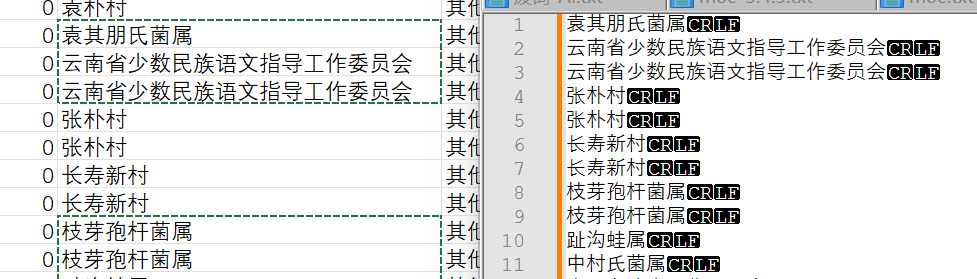
如图 excel选择不连续的内容,直接粘贴到文本编辑器内容变多,如何解决?
我知道可以粘贴到excel的其他位置,再复制一遍可以解决问题,但是这样很奇怪啊?
为什么不能一次就直接粘贴好呢?有没有软件能在用户没有感知的前提下处理掉这个问题
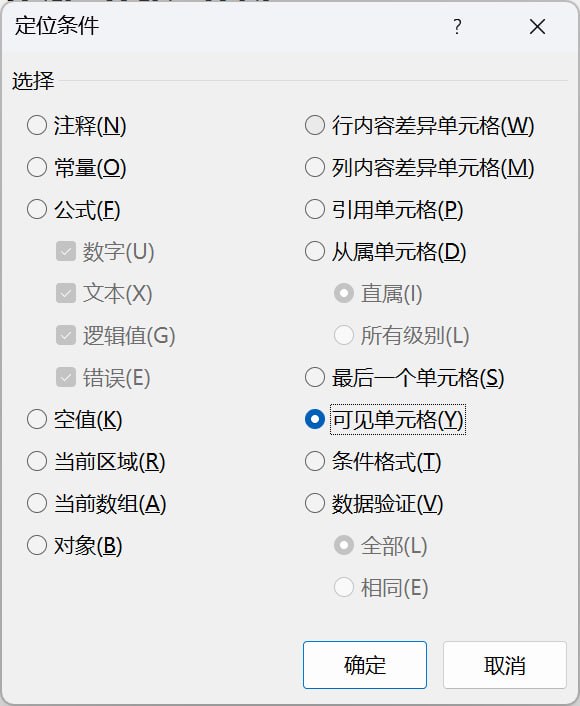
好像。。。没用呀
Ctrl+g选了可见,再复制粘贴还是包含了未选中的行
这个选项,只能过滤掉被隐藏的内容,或被筛选掉的项目。
楼主所说的多余内容(未选中部分),仍然是可见的,既没有被隐藏,也没有被自动筛选过滤掉,因此该选项不能屏蔽它们。
换行符问题,你是就这一个excel有问题还是全部有问题,是就这个编辑器有问题还是全部编辑器都有问题
excel是csv粘贴过来以符号自动分列的,选中的内容是一行中间的格子,理论上不涉及格式的问题
多选不连续格子,粘贴到多个文本编辑器都是这个效果(含记事本和npp)
好像只有使用筛选或者手动隐藏不要选中的行,然后再复制才不会复制到不需要的行。
ai建议用vba, 目前还有一些bug
Sub CopyDiscontinuousToClipboard()
    Dim area As Range, row As Range, cell As Range
    Dim strText As String
    Dim DataObj As Object
    Dim wsh As Object, psCmd As String

    If TypeName(Selection) <> "Range" Then Exit Sub

    ' 1. 提取内容(带 Tab 和 回车)
    For Each area In Selection.Areas
        For Each row In area.Rows
            For Each cell In row.Cells
                If strText = "" Or Right(strText, 2) = vbCrLf Then
                    strText = strText & cell.Value
                Else
                    strText = strText & vbTab & cell.Value
                End If
            Next cell
            strText = strText & vbCrLf
        Next row
    Next area

    If Len(strText) >= 2 Then strText = Left(strText, Len(strText) - 2)

    ' 2. 写入剪贴板并延迟1秒
    Set DataObj = CreateObject("New:{1C3B4210-F441-11CE-B9EA-00AA006B1A69}")
    DataObj.SetText strText
    DataObj.PutInClipboard
    Set DataObj = Nothing
    Application.Wait Now + TimeValue("00:00:01")

    ' 3. 调用 PowerShell 弹出右下角原生通知
    psCmd = "powershell -WindowStyle Hidden -Command ""Add-Type -AssemblyName System.Windows.Forms; " & _
            "$notify = New-Object System.Windows.Forms.NotifyIcon; " & _
            "$notify.Icon = [System.Drawing.SystemIcons]::Information; " & _
            "$notify.Visible = $true; " & _
            "$notify.ShowBalloonTip(1500, 'Excel 复制助手', '不连续内容已复制,可直接去粘贴!', [System.Windows.Forms.ToolTipIcon]::Info); " & _
            "Start-Sleep -Seconds 2; $notify.Dispose()"""

    Set wsh = CreateObject("WScript.Shell")
    ' 异步执行,不阻塞 Excel
    wsh.Run psCmd, 0, False
End Sub
看错问题了,还以为要解决末尾的换行符问题。
某社区大佬的回答:When you copy/paste within Excel, it uses its own internal clipboard that is tailored for Excel.
When you copy in Excel and paste in another application, the data are transferred to the Windows clipboard. This does not support all Excel-specific features. So the behavior that you describe is to be expected.
 看粘贴板里确实是所有行而不是选择的行。
复制excel中的数据时,剪切板中保存的是Biff8数据,理论上用autohotkey在复制后读取剪切板如果识别到biff8数据则解析biff8然后替换剪切板能够无感解决
操作上最简单:复制到新表里面,再从新表删除空行并复制(
在 Excel 中复制的其实是一个连续的矩形区域,因为历史兼容性,目前仍保留了这个逻辑。
WPS 只会复制选中的单元格。
最简单的方式就是你说的那样,先粘贴到excel中再复制一遍。
同表中新建一个sheet专门干这事,复制-粘贴到指定的sheet-再复制,用这个方法VBA可能还好写一点。