软件名称
Bulk Text Replacement for Word
应用平台
- Windows 7/8/10/11
推荐类型
【网友发现】
是否收费
免费
一句简介
可同时替换多个 Word 文档中的文本,标准模式速度非常快。
应用简介
【机翻自英文介绍】一款易于使用的工具,可同时替换多个 Word 文档中的文本。安全处理超链接、文本框、页眉和页脚。使用 diff 上下文预览更改,并一次性处理多个文件。实时匹配计数器在您输入时显示结果。非常适合批量文档更新。下载可执行文件,无需安装!为效率而生。
 Features and best practices
| Feature | Standard Replace | Advanced Replace |
|---|---|---|
| Speed |  Very fast Very fast |
 Comprehensive Comprehensive |
| Main content |  Paragraphs & tables Paragraphs & tables |
Paragraphs & tables |
| Text boxes |  |
All types |
| Headers & footers | |
|
| Footnotes & endnotes | |
|
| Form fields | |
|
| Formatting preserved? | |
|
| Hyperlinks |  Replaces text, but removes link. Replaces text, but removes link. |
Replaces text and preserves links. |
| Regex support | Python regex syntax |
(Word’s native engine) |
| Whole word match | |
|
| Case sensitive | |
|
When to use Standard Replace
Large batch operations (100+ files)/Simple text in paragraphs and tables/No hyperlinks in replacement text/Speed is important/Regex patterns needed
- Remember: If your file has “special content” (text boxes, headers, footers, footnotes, endnotes, form fields, and hyperlinks), but you are not going to replace any of this text, you can still use the very fast Standard Replace. It won’t break any of your “special content”.
When to use Advanced Replace
If you are going to replace “special content”, use Advanced Replace as it will work for both standard content, such as paragraphs and tables, and “special content”. It is just slower than the Standard Replace as it uses Word COM automation instead of python-docx.
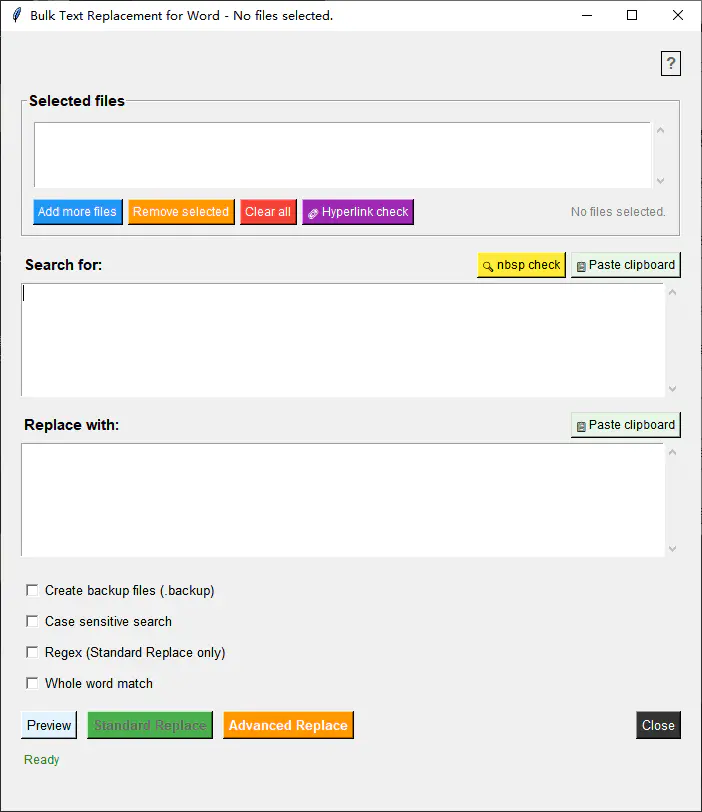
截图预览:
官方网址:
网友补充:
我需要对几十个word文件的内容进行简单替换(比如2005年替换为2006年)时我网上搜了搜,有的需要安装插件工具箱,有的软件功能太多太大,有的试了可以替换但格式变了。这个是我用下来最好用的,标准模式替换速度非常快,而且可以保持原文格式。唯一缺点就是在我的1920×1080且开了150%缩放的桌面上,界面显示超出屏幕点不到替换按钮,使用时我还得把桌面切换到125%或100%缩放。